
Appearance
General Tab (DB Connection)
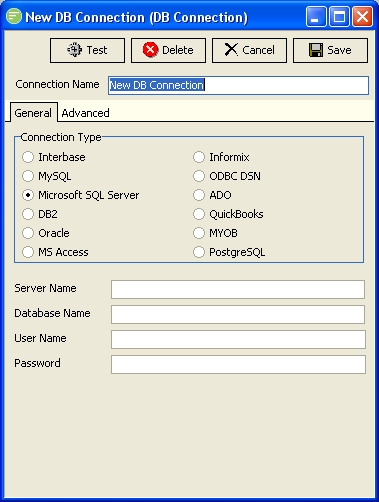
Fields
| Field Name | Description |
|---|---|
| Connection Type | The type of database you wish to connect to. |
| Server Name | Server hosting the database platform |
| Database Name | The name of the database |
| User Name | User name to connect to the database |
| Password | Password for above user |
Details
Connection Type
Select the type of database you wish to connect to. Flow has drivers for the major SQL databases that provides direct high-speed access through the databases client library. ODBC and ADO connections are also available for databases that do not have specific connections.
Your chosen Connection Type will affect how you populate the rest of the fields on the General Tab. Refer to the examples for information specific to a Connection Type.
TIP
It should be noted that the Microsoft SQL Server connection type can also be used to connect to Microsoft SQL Compact databases
Server Name
Enter the name of the computer hosting your database platform.
Your chosen Connection Type will affect how you populate this field. Refer to the examples for information specific to a Connection Type.
Database Name
Enter the name of the database as it is configured in your database platform.
Your chosen Connection Type will affect how you populate this field. Refer to the examples for information specific to a Connection Type.
User Name
Enter the user name for connecting to your database platform. The user will be one that is configured within your database platform. See Users and passwords and refer to Database Users.
Your chosen Connection Type will affect how you populate this field. Refer to the examples for information specific to a Connection Type.
Password
Enter the password for the user name you have entered. The password will be stored in encrypted form within the Flow configuration database.
Your chosen Connection Type will affect how you populate this field. Refer to the examples for information specific to a Connection Type.