
Appearance
Trading Partners Tab
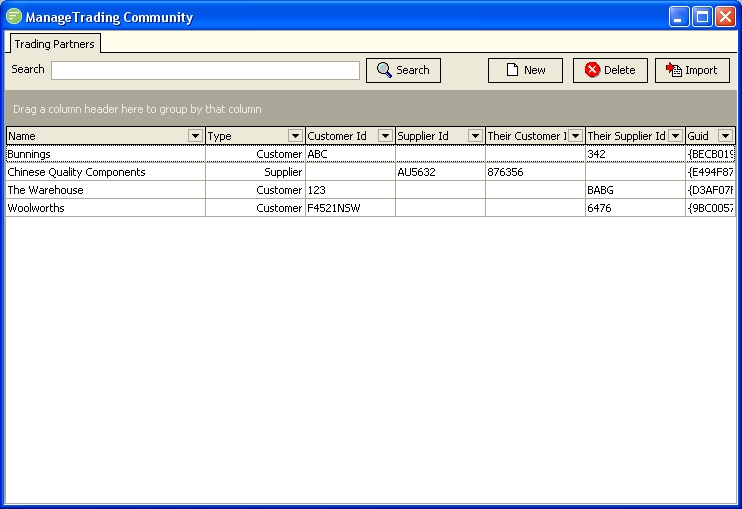
Fields
| Field Name | Description |
|---|---|
| Search | Filter the list to display only the Trading Partners whose Name matches the search pattern. |
| Trading Partner List | A list of trading partners that match the filter. Double click to edit the Trading Partner |
Buttons
| Button Name | Description |
|---|---|
| Search | Click to apply the current filter settings to the list of Trading Partners |
| New | Click to create a new Trading Partner |
| Delete | Click to delete the selected Trading Partner. You can use Control and Shift keys to select multiple Trading Partners. |
| Import | Click to import a Template file containing a Trading Partner. You will be asked for the location of the Template file. See Exporting and Importing |
Details
Search
Enter a search pattern to filter the list to display only the Trading Partners whose Name matches the pattern.
The search pattern can include "wildcard" characters:
- Use % to represent zero or more characters;
- Use _ to represent exactly one character .
A pair of % wildcard characters is automatically included at the beginning and end of the pattern you specify (i.e. pattern x is equivalent to %x% and will find anything containing x).
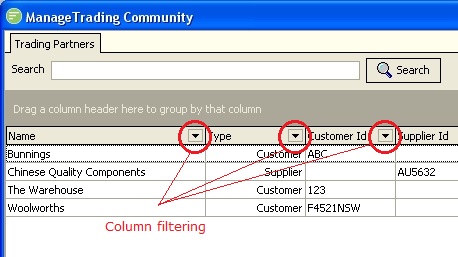
Further filtering can be done via criteria in the column headings ... click on the black triangle to select column-specific filtering.
Trading Partner List
A list of trading partners that match the filter. To edit a Trading Partner, right-click on the entry in the list and select "Edit ..." from the pop-up menu.