
Appearance
General Tab
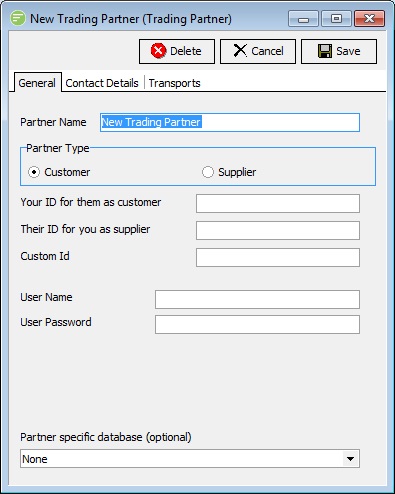
Fields
| Field Name | Description |
|---|---|
| Partner Type | The type of database you wish to connect to. |
| Your ID for them as customer | Only shows if Partner Type is Customer. Enter your unique ID for them as a customer of yours |
| Their ID for you as supplier | Only shows if Partner Type is Customer. Enter their unique ID for you as a supplier to them |
| Your ID for them as supplier | Only shows if Partner Type is Supplier. Enter your unique ID for you as a supplier of yours |
| Their ID for you as customer | Only shows if Partner Type is Supplier. Enter their unique ID for you as a customer to them |
| User Name | Provide a user name for them if you wish them to have access to your FlowWeb or FlowTransportWeb web sites |
| Password | Provide a password for the above user name |
| Custom Id | This is a spare field for you to provide a custom ID. This can be used in mappings to assist with linking a trading partner |
| Transformation Field | Not available in Flow 2.30. |
| Partner specific database | Select a DB Connection that represents a database that is specific to this trading partner. When using party specific databases this allows a single action to be configured that can connect to a different database depending on the trading partner assigned to the Action. |
| Also see Trading Partner Attributes |
Details
Partner Type
To specify whether you regard this Partner as a Customer or a Supplier.
Your ID for them as customer
Only shows if Partner Type is Customer. Enter your unique ID for them as a customer of yours.
Corresponds to Trading Partner Tag: <TPCustomerId>
Corresponds to Partner Object Property: Partner.CustomerId
Corresponds to database column: CUSTOMERID (see ActivatePartnerByWhere)
Their ID for you as supplier
Only shows if Partner Type is Customer. Enter their unique ID for you as a supplier to them.
Corresponds to Trading Partner Tag: <TPTheirSupplierId>
Corresponds to Partner Object Property: Partner.TPSupplierId
Corresponds to database column: TPSUPPLIERID (see ActivatePartnerByWhere)
Your ID for them as supplier
Only shows if Partner Type is Supplier. Enter your unique ID for you as a supplier of yours.
Corresponds to Trading Partner Tag: <TPSupplierId>
Corresponds to Partner Object Property: Partner.SupplierId
Corresponds to database column: SUPPLIERID (see ActivatePartnerByWhere)
Their ID for you as customer
Only shows if Partner Type is Supplier. Enter their unique ID for you as a customer to them.
Corresponds to Trading Partner Tag: <TPTheirCustomerId>
Corresponds to Partner Object Property: Partner.TPCustomerId
Corresponds to database column: TPCUSTOMERID (see ActivatePartnerByWhere)
User Name
Provide a user name for them if you wish them to have access to your FlowWeb or FlowTransportWeb web sites
Corresponds to Trading Partner Tag: <TPUsername>
Corresponds to Partner Object Property:Partner.Username
Corresponds to database column: USERNAME (see ActivatePartnerByWhere)
Password
Provide a password for the above user name
Corresponds to Trading Partner Tag: <TPPassword>
Corresponds to Partner Object Property:Partner.Password
Corresponds to database column: (encrypted) USERPASS (see ActivatePartnerByWhere)
Custom Id
This is a spare field for you to provide a custom ID. This can be used in mappings to assist with linking a Trading Partner.
Corresponds to Trading Partner Tag: <TPFlowNetId> or <TPMemberID>
Corresponds to Partner Object Property:Partner.FlowNetId
Corresponds to database column: MEMBERID (see ActivatePartnerByWhere)