

Appearance
Documents
Documents lists the trading documents exchanged with your partners, such as purchase orders and invoices, and where each one is up to. It is a tracking view: documents arrive and are sent by your integrations, not uploaded here.
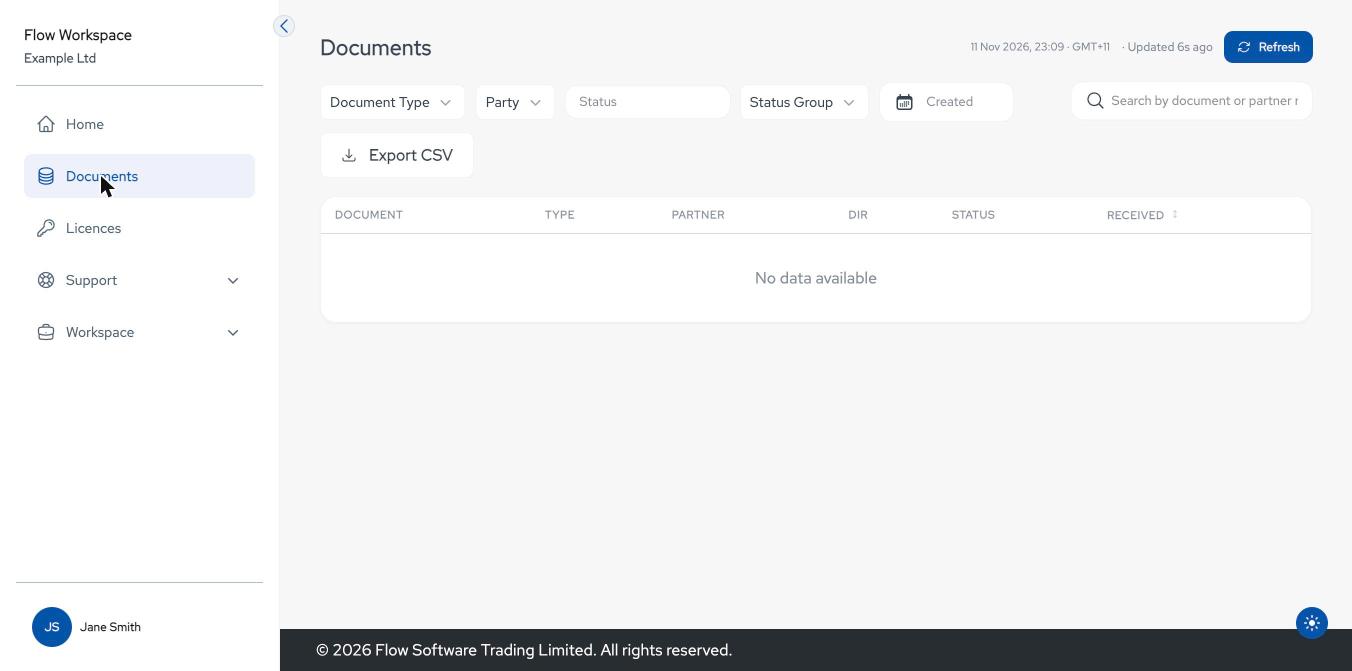
Finding a document
- Filters across the top narrow the list, for example by document type, partner, status or date. Which filters you see depends on your setup. The list updates as you change them.
- Search finds a document by its number or the partner's reference.
- Received sorts by the time the document arrived.
- Refresh reloads the list; the header shows when it was last updated.
- Load more at the bottom fetches the next page of documents.
Filters are kept in the page address, so you can bookmark or share a filtered view.
| Column | Shows |
|---|---|
| Document | The document number. |
| Type | Purchase Order, Invoice, Despatch Advice, Pick Request or Acknowledgement. |
| Partner | The trading partner. |
| Dir | IN for documents received, OUT for documents sent. |
| Status | Complete, In progress, Needs your input, Pending, Failed or Cancelled. |
| Received | When it arrived: a time for today, "Yesterday", or the date. |
Export CSV downloads the documents currently shown as a CSV file.
Document details
Select a document to see its details. Back to documents returns to the list.
The header shows the number, type, partner, direction and status, with when it was received and last updated.
A banner explains anything that needs attention:
Banner Meaning This one's failed. Flow has picked it up. Processing failed and Flow is looking at it. We need your help with this one. Flow needs information from you; contact support. We're retrying, no action needed yet. A temporary problem; it is being retried. This document is being processed. Still in progress. View original document downloads the file as it was received or sent.
What's happened so far is a timeline of the document's processing.
Key details and Line items show its content: product, GTIN, quantity, price and total.
Linked documents lists related documents, for example the invoice for an order.
Technical detail is for Flow engineers and is collapsed by default.